Top Five Free Generative AI Platforms
Free generative AI platforms compared as of October 2026: what ChatGPT, Gemini, Meta AI, Claude and Perplexity really give you for free.


Free generative AI platforms are no longer a list you can write once and forget. The first version of this article went live in December 2023 and described a Bard-era Gemini and Llama 3.3. I rewrote it from scratch on 8 October 2026, checking each claim against the vendor’s own pricing or help page, so the limits below are the ones in force now, not the ones in last year’s screenshots.
Last verified: 8 October 2026. Free tiers change often, so treat the numbers here as a snapshot and check the linked pages before you plan around them.
What changed in free generative AI platforms this year
- ChatGPT: OpenAI’s pricing page now lists unlimited text chats on the Free plan, but ads may appear on Free and Go.
- Gemini: from 9 October 2026, users without a Google AI subscription are limited to Flash-Lite, according to Google’s help page.
- Meta AI: the assistant now runs on Muse Spark, a proprietary model, so any advice built around Llama is out of date.
- Claude and Perplexity: both still have a permanent free plan, with the expensive features (Claude Code, Research, higher usage) reserved for paid tiers.
How I compare free generative AI platforms
A free plan is a product decision by the vendor, so I look at five things before recommending one:
- The model you actually get. A brand name means little if the free tier is routed to the smallest model.
- Where the ceiling is. Message caps, context window, uploads, images, research runs.
- Which tools are included. Web search, file handling, code execution, connectors.
- What happens to your data. Training opt-outs, and whether the company is funded by ads.
- How easily you can leave. Export options, and whether the workflow still works if the free tier shrinks again.
Free generative AI platforms compared at a glance
| Platform | Free model access | What is capped | Best for | Watch out |
|---|---|---|---|---|
| ChatGPT | GPT-6 Luna, unlimited text chats | Uploads, images, voice, deep research, memory | Everyday drafting and general questions | Ads may appear on Free |
| Gemini | Flash-Lite only from 9 Oct 2026 | Compute-based limit, resets every 5 hours up to a weekly cap | Quick, light prompts | Flash and Pro leave the free plan |
| Meta AI | Muse Spark | Newer agent features arrive market by market | Quick questions inside Meta’s apps | Proprietary model, ad-funded company |
| Claude | Sonnet and Haiku | Session allowance resets every 5 hours; no Claude Code or Research | Writing, long documents, code review | Long, tool-heavy chats use the allowance fast |
| Perplexity | Basic models with cited answers | Pro Search, Research and uploads are rationed | Research with sources | Model choice sits behind Pro |
Top Five Free Generative AI Platforms
1. ChatGPT by OpenAI
ChatGPT is still the default starting point for most people. OpenAI lists unlimited text chats with GPT-6 on the Free plan, subject to abuse guardrails, and its comparison table names GPT-6 Luna as the model you get. The ceilings now sit elsewhere: file uploads, image creation, voice, deep research, memory and Codex are all limited on Free. The same table shows a smaller working context on Free, about 27K tokens for the instant model against 54K on Go and Plus, so long documents are where you feel the difference first.
What you get free:
- Unlimited text chats with GPT-6 Luna, plus web search, projects and study mode.
- Limited uploads, image creation, voice, deep research and Codex access.
- Ads. OpenAI began testing them in the US on 9 February 2026 and says they may appear on Free and Go, never on Plus or Pro. In regions where ads are tested you can switch to an ad-free Free experience, at the price of lower limits. Details are on OpenAI’s ads help page.
Best for: general drafting, brainstorming, summaries and quick coding questions.
Watch out: the thin context window on long inputs, and ads if you are in a test region. In India, OpenAI also ran a limited-time offer of 12 months of ChatGPT Go from November 2025; check the app to see whether it is still open to you.
2. Gemini by Google
Gemini is the entry with a date attached. Google’s help page says model availability changes for personal accounts starting October 2026, and that the change takes effect for users without an AI subscription on 9 October. After that, a free account has Flash-Lite, the lightest of the three tiers. Flash and Pro are no longer included, and Google AI Plus subscribers lose Pro as well. The Gemini app itself stays free.
Usage limits are compute-based. They refresh every five hours until you reach a weekly limit, and Google says heavier work such as media generation, Deep Research, Pro models and extended thinking uses more of it.
What you get free:
- Gemini in the app and on the web with Flash-Lite, at standard limits.
- Effort levels (low, medium, high) on each available model; higher effort uses your limit faster.
Best for: quick answers, short drafts and everyday prompts where speed matters more than depth.
Watch out: Flash-Lite is built for speed and cost, so I expect weaker results on long reasoning chains and complex code. Test it on your own prompts before you rely on it, because the model you used last month may no longer be on offer.
3. Meta AI by Meta
Meta AI is the entry I had to rewrite most. The 2023 text described it through Llama 3.3. Since April 2026 the assistant runs on Muse Spark, the first model from Meta Superintelligence Labs, which Meta describes as its most powerful model so far. Meta said it powers the Meta AI app and meta.ai first, with rollout to WhatsApp, Instagram, Facebook, Messenger and Meta’s AI glasses to follow.
In July, Meta announced that Muse Spark 1.1 powers the app and added planning, email and calendar connections and slide creation, rolling out in select markets (see Meta’s announcement). Muse Spark is closed. Llama remains Meta’s open-weight family for developers, but it is a separate story from the assistant.
What you get free:
- The assistant in the Meta AI app, on meta.ai and inside Meta’s apps.
- Voice conversations and multimodal input.
- Newer agent features in select markets only, so what you see depends on your country.
Best for: quick questions without leaving WhatsApp or Instagram.
Watch out: Meta funds its products through advertising, so I would not paste anything into it that I would not give an ad-funded company. Feature availability also varies by country.
4. Claude by Anthropic
Claude is the easiest free plan to describe, because Anthropic’s pricing page spells it out. Free gives you chat on web, desktop and mobile, web search, file creation and code execution, memory, connectors to your apps, Artifacts, voice mode, Skills and up to five projects. The models are Sonnet and Haiku. Opus and Fable are paid, and so are Claude Code, Research and Claude Design, Slides and Docs.
Usage runs on a session allowance that resets every five hours, with no fixed message count. A short text chat costs little, while a long conversation with files and tools uses the allowance much faster.
What you get free:
- Sonnet and Haiku with web search, code execution and file creation.
- Memory, projects (up to five), Artifacts and connectors.
- Skills. If you want to build reusable ones, start with my Claude Skills blueprint.
Best for: writing, long-document analysis and code review.
Watch out: the allowance, and the paid-only features. Pro costs $17 a month billed annually or $20 billed monthly. Model training on your chats has an opt-out on Free and paid individual plans. To see what connectors do under the hood, read my MCP guide.
5. Perplexity
Perplexity is the odd one out because it is an answer engine first and a chatbot second. The free plan keeps the core of the product: searches that return an answer with citations you can open. What is rationed is the heavier work, meaning Pro Search, Research and file uploads. Published guides disagree on the exact daily numbers and Perplexity adjusts them, so I am not quoting one. Perplexity’s help center lists model selection, extended Research, more uploads and image generation as Pro benefits.
What you get free:
- Cited answers to everyday questions at perplexity.ai.
- A limited allowance for deeper search modes.
Best for: research where you want to see the sources behind every claim.
Watch out: a citation is a pointer, not proof. Open the source before you repeat a number from it.
Honorable mentions
These did not make the top five, but they are worth knowing if one of the five stops working for you:
- DeepSeek offers a free hosted chat with strong reasoning and open-weight models. Check where your data is processed before using it for anything sensitive.
- Microsoft Copilot has a free consumer tier tied to a Microsoft account, with web search and image creation.
- Grok has a limited free tier and is the only one here with live access to X posts.
- Mistral Le Chat is a free assistant from a European provider, useful if EU data handling matters to you.
Image generation has its own quality and licensing questions, which I cover separately in AI Image Generation Models: How to Evaluate and Choose.
Free does not mean private
The price of a free generative AI platform is paid in data, ads or upgrade pressure. Keep three rules:
- Do not paste secrets, customer data or code under NDA. OpenAI and Anthropic both list a training opt-out on their plans, but an opt-out is a setting you have to find and set, not a guarantee.
- Treat answers as drafts. Models still state wrong things fluently, and free tiers often route you to smaller models.
- Know the attack surface. Pasting untrusted text into an assistant that has web or file access is how prompt injection starts. The OWASP Top 10 for LLM Applications is a good primer, and my notes on AI security, sensitive data protection and data privacy and user rights cover the engineering side.
Which free generative AI platform should you use?
- General everyday use: ChatGPT, unless ads or the short context window bother you.
- Writing, long documents and code review: Claude, and plan around the five-hour allowance.
- Research with sources: Perplexity, then open the citations.
- Quick light prompts: Gemini, once you have tested Flash-Lite on your own tasks.
- Questions inside WhatsApp or Instagram: Meta AI.
If you write code for a living, free chat tiers are a sampler, not a toolchain. My AI tools for developers matrix covers what a team should actually standardise on. If you are new to the field, start with Core Concepts of AI: Beyond ChatGPT. For anything agentic that goes past chat, see AI Agent Harnesses, Explained.
Free generative AI platforms FAQ
Which of the free generative AI platforms is best?
There is no single winner. ChatGPT is the safest general default, Claude is strongest in my view for long writing and review work, and Perplexity is the one built around sources. Pick by task, then test with your own prompts.
Is ChatGPT still free?
Yes. OpenAI lists unlimited text chats on the Free plan, with limits on uploads, images, voice and deep research. Ads may appear on Free and Go in regions where OpenAI is testing them.
What happens to Gemini’s free plan on 9 October 2026?
Google’s help page says users without an AI subscription are limited to Flash-Lite from that date, and Flash and Pro are no longer available to them. The app stays free.
Is the free version of Claude enough?
For everyday writing, analysis and light coding help, usually yes. You hit the five-hour allowance faster with large files and tool use, and Claude Code, Research and the Opus and Fable models need a paid plan.
Are free generative AI platforms safe for work data?
Not by default. Keep secrets, customer records and confidential code out of consumer free tiers, check the training opt-out, and use your company’s approved tool for anything sensitive.
Do free limits change often?
Yes. Google changed Gemini’s limits in May 2026 and again in October 2026. Check the vendor pages in the sources below before you commit a workflow.
Sources for this guide
- ChatGPT pricing and Ads in ChatGPT (OpenAI): Free plan contents, model access, context windows and ads policy.
- Changes to Gemini model access and limits (Google): the 9 October 2026 model change and compute-based limits.
- Introducing Muse Spark and Meta AI Doesn’t Just Think, It Acts (Meta).
- Claude plans and pricing (Anthropic): free plan features, models and Pro pricing.
- What is Perplexity Pro? (Perplexity help center).
- OpenAI offers free ChatGPT Go for one year to all users in India (TechCrunch).
- OWASP Top 10 for LLM Applications.
Related reading: AI Tools for Developers: An Opinionated Matrix, AI Image Generation Models, Jev AI Model: The Fastest Adopted Model in AI Gateway History, and more in Tech Updates.
Updated 8 October 2026: full rewrite. Replaced Llama 3.3 and Bard-era claims with current Meta AI, Gemini, ChatGPT, Claude and Perplexity free-tier details, and added a privacy section and FAQ.
Related articles
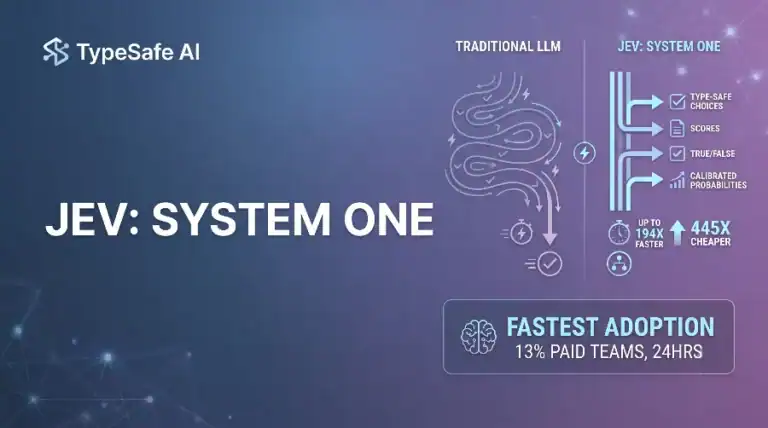
Jev AI Model: The Fastest Adopted Model in AI Gateway History
Jev reached nearly 13% of paid AI Gateway teams unusually fast. Here is what that adoption curve means…
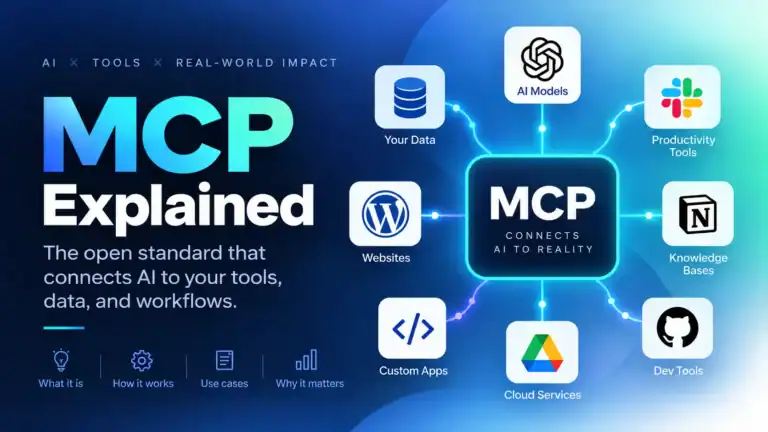
MCP Explained: Model Context Protocol Guide
MCP standardizes how apps expose tools, resources, and prompts to LLMs. I cover architecture, security, and working server…
AI Agent Harnesses, Explained
The model is the brain; the harness is the room it works in. A field guide to loops,…

Nonprofit volunteers needed workable free genai tools. Tradeoffs listed here matched what we saw on the ground.
Student workshop budget froze again, so no-cost model access options mattered more than brand names this week.
Passed top free AI platforms notes to a colleague spinning up a student workshop. Licensing caveats helped.
Campus lab machines cannot install paid copilots. Free GenAI platform shortlist here is what we printed for the tutors.
FAQ answer got rewritten with closer wording. Kept it for the student ai platforms section alone.