
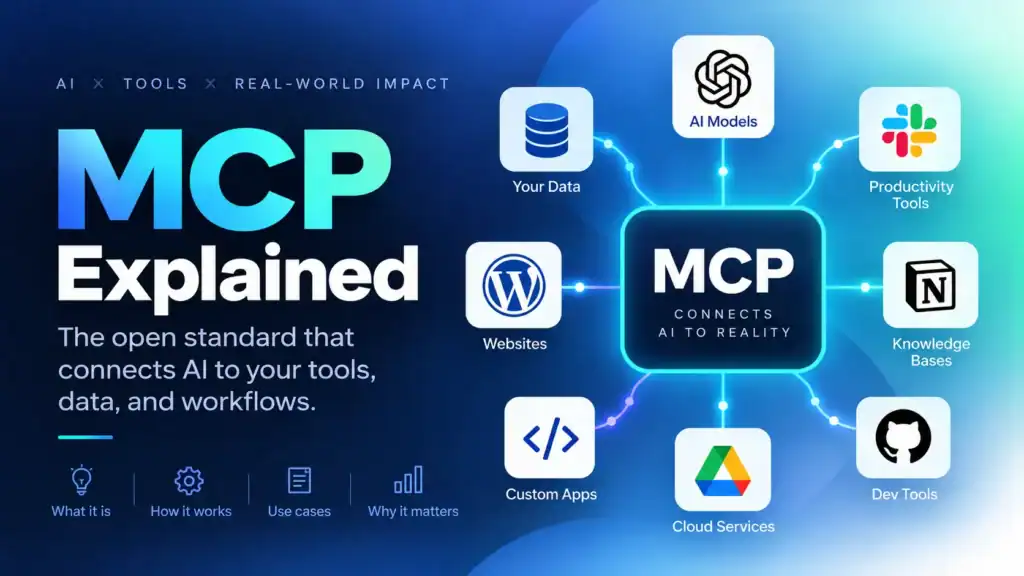
If you have written code that calls an LLM API, you know the drill: define tools, parse the tool call the model returns, run the function, paste the result back. This Model Context Protocol guide shows how MCP removes the glue code teams duplicate across apps: one agreed way for AI applications to discover and call external capabilities, so a single MCP server works in any compatible MCP host.
1. What is MCP? A Model Context Protocol guide
This Model Context Protocol guide starts with the interface, not the capability. MCP standardises how one application describes and calls a capability that another system owns, so your SQL stays your SQL. Because the protocol fixes the message format, the roles and the security model, one server can serve any compliant application. Anthropic published it in November 2024, and it has since become a multi-vendor standard, versioned by date.
The problem MCP solves
Before MCP, connecting M applications to N capabilities meant M x N bespoke connectors. MCP collapses that matrix, so one server per capability serves every compliant host, with one authentication story and one permission boundary.
It is not a model or an agent framework, and it is not a replacement for your API. Instead, it adapts the service you already run. It is also not a security feature.
MCP vs APIs and function calling
Function calling is how a model expresses intent to call something: a name plus JSON arguments in the provider’s tools array. MCP decides where those tools come from, because the client discovers them at runtime, invokes them and returns the answers. Meanwhile, your app still sends messages plus tools[]: the MCP client turns tools/list into that array and each model tool call into tools/call, while the server validates and executes against your API, SQL or CLI, which does not change.
2. Architecture: hosts, clients and servers
Host, client and server
MCP has three roles. The host is the AI application the user runs (Claude Desktop, VS Code, Cursor). A client is a connector inside the host, one per server, owning that server’s transport and message stream. The server publishes capabilities and executes them. Because servers never call each other, the host aggregates the tool lists and the model sequences the calls.
How MCP works
The current revision is stateless: capabilities travel with each request in _meta, the server advertises its surface through server/discover, and any replica can serve any request. Older revisions relied on an initialize handshake and Mcp-Session-Id sessions, so 2026-07-28 removed both; consequently, a call that needs more input uses a multi-round-trip request (elicitation).
The mistake everyone makes onceUnder the stdio transport, standard output is the protocol channel. One stray print on stdout corrupts the stream and looks like a random crash. Therefore, log to stderr only: the protocol deprecated its own logging feature.
Failures come in two shapes. A protocol error arrives as a JSON-RPC error object (unknown method, malformed params) and tells the model nothing useful. A tool execution error is a normal response with isError: true and a text block the model can act on. Contract problems belong to the first; anything an operator could fix by trying something else belongs to the second.
3. Tools, resources and prompts
A server exposes three primitives, and what separates them is not what they do but who decides when to use them, which settles most “tool or resource?” arguments. Transports follow the same split, so reach for stdio when a host launches the server locally as a child process, and Streamable HTTP when many clients reach a shared server behind a URL. Revision 2026-07-28 also deprecated HTTP+SSE.
| Primitive | Controlled by | Methods | Typical use |
|---|---|---|---|
| Tool | The model | tools/* |
Actions: create a ticket, run a query, search documents |
| Resource | The application | resources/* |
Read-only context: files, schema, logs, documentation |
| Prompt | The user | prompts/* |
Reusable workflows, usually surfaced as slash commands |
Tools have a name, a description, a JSON Schema for arguments and optional annotations (readOnlyHint, destructiveHint). The description is the only documentation the model reads, and because the server supplies the annotations, treat them as ergonomics rather than a security control. Prefix names (jira_create_issue) to avoid collisions across servers.
Resources carry read-only data that clients fetch by URI, including templates such as orders/{order_id}, so you publish one pattern instead of ten thousand rows. Although tool support is universal, resource support is not, so keep a thin tool as a fallback. Prompts are templates the user invokes to launch a team workflow; therefore, treat them like any other API you publish.
Results come back as content blocks and, when the tool declares an output schema, as structuredContent; return both, because structured data serves your code and readable text serves the model. Elicitation lets a server ask the user for missing input mid-call, so never use it for secrets. Tasks and interactive apps are extensions, and revision 2026-07-28 deprecates roots, sampling and logging.
4. Build your first Model Context Protocol server
Prerequisites: Python 3.10+ with uv add "mcp[cli]", or Node 20+ with ESM plus @modelcontextprotocol/server. Therefore, you need no model API key to test a server.
A working Python server
# server.py
import json
import httpx
from mcp.server import MCPServer

mcp = MCPServer("weather")


@mcp.tool()
async def get_forecast(city: str, days: int = 3) -> str:
    """Get the multi-day weather forecast for a city.

    Args:
        city: City name, for example "Lahore".
        days: Days to include, between 1 and 7.
    """
    async with httpx.AsyncClient(timeout=10) as client:
        response = await client.get(
            "https://api.example.com/forecast",
            params={"city": city, "days": max(1, min(days, 7))},
        )
        response.raise_for_status()
    return json.dumps(response.json())[:4000]


if __name__ == "__main__":
    mcp.run()
Then run it with uv run mcp dev server.py (Inspector UI), uv run mcp run server.py (stdio) or uv run mcp install server.py (register it with a host). Three details matter: the docstring becomes the tool description, so write it for a model; the type hints become schema constraints, so tighten them; and the return value must be text with a size cap. An unbounded result is the most common way a server ruins a conversation.
TypeScript follows the same shape: new McpServer({ name, version }), then server.registerTool(name, { description, inputSchema, annotations }, handler) with zod 4 schemas, and serveStdio(server) exposes it. Meanwhile, an import of FastMCP or @modelcontextprotocol/sdk means you are reading SDK v1 material.
Test it in memory first
Both SDKs can call a server in memory, with no subprocess and no model:
from mcp.client import Client
from server import mcp


async def test_forecast_tool_is_exposed():
    async with Client(mcp) as client:
        tools = await client.list_tools()
        assert "get_forecast" in {t.name for t in tools.tools}
Assert what breaks silently: discovery is stable, invalid input fails politely, upstream 429s and timeouts arrive as isError messages rather than crashes, and output stays inside the context budget. Finally, snapshot your schemas so an accidental rename fails a test instead of a user.
Deploying over HTTP
mcp.run(transport="streamable-http", port=3001)
Treat a remote MCP server as an API: require OAuth 2.1 with audience-bound tokens, per-user identity, size limits, timeouts, rate limits and audit logs, and keep secrets out of logs.
5. Connect it to an AI client
Hosts differ in details but agree on the shape: a name, how to launch the server, and environment variables. This is the Claude Desktop format:
// claude_desktop_config.json
{
  "mcpServers": {
    "weather": {
      "command": "uv",
      "args": ["--directory", "/absolute/path/to/weather-server", "run", "server.py"],
      "env": { "FORECAST_API_BASE": "https://api.example.com" }
    }
  }
}
Cursor uses .cursor/mcp.json with the same mcpServers key; VS Code uses .vscode/mcp.json, where the key is servers and the transport is explicit ("type": "stdio" or "http").
If a server looks broken on first connect, suspect a relative path in the config, a host you never restarted, something writing to stdout, a server that crashed before responding, or a missing environment variable. Then check the host’s MCP log rather than the chat window.
Tool discovery
Discovery mirrors your own tool definitions almost field for field: tools[].name becomes name, the description becomes description (it is prompt text), and inputSchema becomes parameters. In addition, a good host filters tools by authorization, budgets context and respects caching hints.
Request and response flow
The loop is short: list the tools, map them into tools, execute each call the model asks for through tools/call, append the results, and repeat until the model answers without asking for a tool. Then, harden it:
Tool calling
- Cap the iterations (eight to ten), or a confused model will ping-pong between two tools until it burns the budget.
- Validate arguments server-side every time, and never auto-run destructive or externally visible tools without confirmation.
- Feed
isErrorresults back as text so the model can recover, because a dead transport fails the whole turn rather than one tool call. - Retry only idempotent calls, and keep stack traces, SQL and secrets out of results.
6. Security: the part that decides whether this ships
Three sentences carry this section. A third party writes the tool description, so treat it as prompt text. A tool result carries content nobody has vetted, so treat it as untrusted. The model is a reasoning component, not an access-control layer. Consequently, neither prompt injection nor tool poisoning has a protocol-level fix, because instructions and data share one channel.
Prompt injection and tool poisoning
| Threat | How it works | Primary control |
|---|---|---|
| Tool poisoning | Hidden instructions inside a tool description or schema | Use reviewed servers, pin versions, show users what they install |
| Indirect prompt injection | Hostile text arrives in a tool result, such as an email body | Treat tool output as untrusted and require approval for side effects |
| Tool shadowing | A second server defines a familiar name and captures calls | Namespace tools and review the merged tool list |
| Token passthrough | A server accepts a token that belongs to another audience and forwards it | Validate issuer, audience, expiry and scopes on every request |
Permissions and authentication
- Authenticate every remote request with OAuth 2.1 and PKCE, checking issuer, audience, expiry and scopes. Reject any token that another service minted, instead of forwarding it.
- Act as the individual user, not a shared service account, with read-only scopes by default so a read conversation cannot write.
Input validation
- Validate every argument server-side against the schema, allowlist paths and URIs, parameterise queries, cap response sizes, redact secrets and block server-side request forgery to internal addresses.
Oversight and supply chain
- Require human approval for anything destructive, externally visible or expensive, and prefer a preview the user commits.
- Pin versions, review servers before installing, containerise third-party ones, and log who called which tool with which arguments and a correlation id.
7. Use cases, and when not to use MCP
| Use case | What the server exposes | Watch out for |
|---|---|---|
| Internal documentation | Resources for runbooks, a search tool, a prompt per workflow | Stale indexes; filter results by the caller’s permissions |
| Warehouse analytics | Schema resources, a read-only query tool, a chart tool | Exfiltration through aggregates, cost, unbounded results |
| Incident response | Read tools for metrics, logs and deploys, plus a triage prompt | Never mutate production without approval; build the dry run first |
| AI agents and automation | Read tools plus approved write tools across several systems | Unbounded loops, duplicate writes, runaway cost |
| Developer tooling and SaaS bridges | Thin tools for issues, CI status and one API each | Comment spam, duplicate tickets, shared-account attribution |
Database access has the clearest payoff: expose the schema as resources so the model stops guessing column names, run queries as a read-only role with a statement timeout and a row cap, and reject anything that is not a single SELECT, because write access rarely repays the risk.
However, MCP is the wrong answer when one application uses the capability, when the call is deterministic and no model chooses it, or when you cannot describe the tool clearly in two sentences: a thin, vague server is worse than a direct function call.
8. Best practices and production
Everything in this Model Context Protocol guide follows from one fact: tool definitions are prompt engineering, so they deserve the same review and evaluation as a prompt.
- Write descriptions for selection: what it does, when to use it, what it returns, and when to use another tool instead. State cost and side effects plainly, because that text is all the model reads.
- Shape tools around tasks, not tables.
resolve_invoice_disputebeatscreate_refund_rowplusupdate_invoice_status. Stay under twenty tools per server. - Tighten schemas:
enumfor fixed value sets,minimum,maximumandmaxLength, an exact required list andadditionalProperties: false. - Make destructive work two-step: a preview the user commits, plus an idempotency key against duplicate retries.
- Make errors teachable:
isError: true, a message saying what failed and what to try instead, a stable code instructuredContent, and an explicit note when you truncate output. - Make the server stateless, dependable and observable: keep per-call state out of process memory, persist anything spanning calls under an explicit id with a TTL, set deadlines on outbound calls, and emit one span per call with tool, outcome and correlation id.
- Version the surface as your public API, and run it like a service: adding a tool or an optional argument is safe, while renaming one, changing a type or changing behaviour under the same name is breaking; deploy stateless replicas with per-request authorization, size limits, canary and rollback.
9. MCP FAQ
Is MCP a replacement for REST APIs?
No. Your API, database or CLI keeps doing the work; the MCP server is a thin adapter that describes the capability to an AI application and calls it when the model asks. Authentication, business rules and rate limits stay in the service.
Is MCP the same as function calling?
Different layers, and you normally use both. Function calling is how a model expresses intent to call something through the provider’s tools array; MCP decides where those tools come from, how the client discovers and invokes them, and how it returns the answers.
What is the difference between a tool, a resource and a prompt?
Tools are functions the model decides to call. Resources are read-only data the application loads by URI for context. Prompts are user-invoked templates that seed the conversation with an agreed workflow.
Which transport should I use for an MCP server?
Use stdio when a host on the same machine launches the server as a child process, which is the default for local tools. Use Streamable HTTP when many clients reach the server behind a URL. HTTP with SSE is deprecated.
Is MCP secure enough for enterprise use?
MCP defines the mechanisms; security depends on your implementation. For remote servers that means audience-bound OAuth 2.1 tokens, per-user identity, least privilege, server-side validation, approval for destructive actions and audit logging. Tool descriptions and results are untrusted content, because both can carry prompt injection.
How do I spot an out-of-date MCP tutorial?
An initialize request, an Mcp-Session-Id header or a session lifecycle means it predates revision 2026-07-28. roots, sampling and protocol-level logging are deprecated, and FastMCP or @modelcontextprotocol/sdk means SDK v1.
10. Sources for this Model Context Protocol guide
- MCP specification, revision 2026-07-28: the spec, the deprecation registry and the security best practices document.
- Python SDK and the TypeScript SDK:
MCPServer,McpServerand themcpCLI. - MCP Inspector and the MCP Registry: the debugging client and the official server registry.
- JSON-RPC 2.0, RFC 8707 resource indicators, RFC 9728 and OAuth 2.1: the message format and authorization rules MCP builds on.
- Tool poisoning research (Invariant Labs) and the OWASP Top 10 for LLM Applications: the work behind the threat table in section 6.
Related reading: AI agent harnesses, Claude Skills series, LangChain 101, and n8n AI workflow.
Last updated on 1 October 2026
Related articles
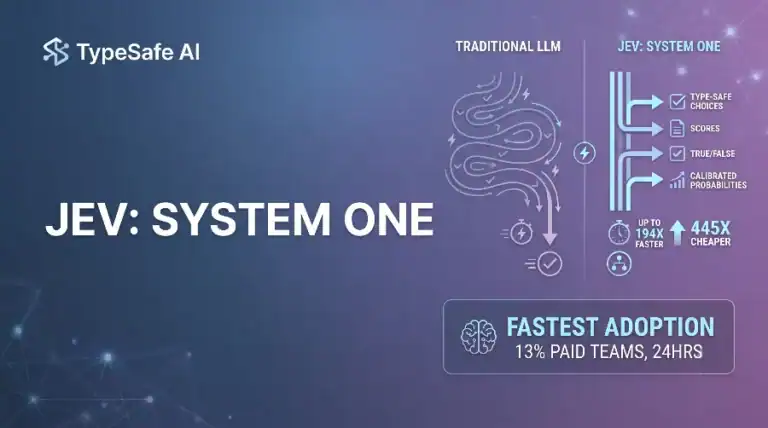
Jev AI Model: The Fastest Adopted Model in AI Gateway History
Jev reached nearly 13% of paid AI Gateway teams unusually fast. Here is what that adoption curve means…
Tool Sandboxing and Permission Models: Least Privilege for Agents
Tool sandboxing and permissions for AI agents: least privilege, role tiers, capability isolation, and sandboxes that actually limit…
Prompt Injection in Agents: Indirect Attacks Through Tools and Data
How prompt injection in agents works through tools and data, and the defense-in-depth stack: least privilege, output validation,…
Clear explanation of MCP; finally clicked for me how tools and context stay separate. Bookmarking this for my team.
Been writing tool schemas by hand for months. Model Context Protocol framing is the cleanup pass we needed.
Borrowed the framing for a same-day spike. Wording around model context protocol slipped into the runbook.
Reread it once on the train home. Live demo path follows model context protocol.
MCP as a shared protocol for tools beats writing yet another custom parser for every model response we get.
[…] pipelines. When the same tools need to be called from an IDE agent or CLI, expose them through Model Context Protocol (MCP) instead of duplicating HTTP glue. For agent loop design and evaluation harnesses, see AI agent […]
[…] you later move the same flow into an agent tool host, pair it with Model Context Protocol so editors and agents share one tool surface instead of bespoke HTTP […]
[…] Model Context Protocol servers for docs, DB, browser, issue trackers […]
[…] agent automation, expose generation through MCP tools with strict allowlisted sizes and folders; see also agent harnesses for timeouts and spend […]
[…] reading: Model Context Protocol, AI agent harnesses, Claude Skills, and LangChain […]
[…] reading: Model Context Protocol guide, AI agent harnesses, LangChain 101, and n8n AI […]
[…] reading: Model Context Protocol guide, AI agent harnesses, LangChain 101, and n8n AI […]