MongoDB Replica Sets Explained: High Availability Without the Complexity
How MongoDB replica sets work: members, elections, oplog, write and read concern, read preference, retryable writes and rolling maintenance.

MongoDB replica sets are the foundation of every production MongoDB deployment I run. Even a small application gets one, because a single mongod means a single disk, a single machine and a single maintenance window away from an outage. Here I write about how replica sets work, the settings that actually matter, and the mistakes I see teams make once they have one.
If replication concepts in general are new to you, my post on database replication covers leader-follower, multi-leader and leaderless designs. MongoDB uses leader-follower, and what follows is how it does that in practice.
Why Use MongoDB Replica Sets
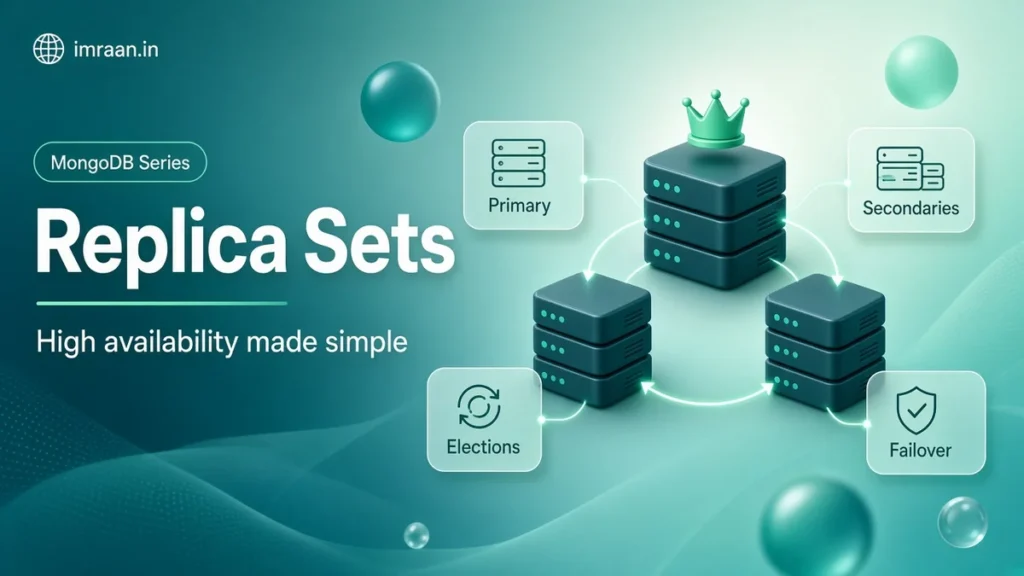
A replica set is a group of mongod processes that hold the same data. One member is the primary and accepts writes. The others are secondaries that copy the primary’s changes and can take over if it fails. That gives you two things. The first is redundancy, since your data lives on several machines. The second is automatic failover, since the set elects a new primary without human intervention.
Replication is not backup. If someone runs deleteMany({}) against the wrong collection, every member deletes those documents within seconds. You still need backups, which I cover in the backup and restore post. Replication is also not a way to scale writes. Every write goes to the primary. When writes outgrow one machine, that is sharding, and my post on sharding vs replication explains the difference.
Members and Roles in MongoDB Replica Sets
Every replica set has one primary and one or more secondaries. A few special member types exist:
- Arbiter: votes in elections but holds no data. Cheap, but it weakens majority writes, as I explain below.
- Priority 0: holds data and votes but can never become primary. Useful for a member in a distant data centre.
- Hidden: priority 0 and invisible to client reads. Good for dedicated backup or reporting members.
- Delayed: a hidden member that applies changes a fixed time behind the primary. It gives you a window to recover from mistakes, though it is no substitute for real backups.
A replica set can have up to 50 members, but at most 7 can vote. Keep the number of voting members odd so a majority is always well defined. Here is a standard three-member set:
rs.initiate({
  _id: "rs0",
  members: [
    { _id: 0, host: "db-a.internal:27017", priority: 2 },
    { _id: 1, host: "db-b.internal:27017", priority: 1 },
    { _id: 2, host: "db-c.internal:27017", priority: 1 }
  ]
})
The higher priority on db-a means it is preferred as primary when healthy. The replica set configuration reference documents every member option.
Elections and Failover in Replica Sets
Members exchange heartbeats every two seconds. If the secondaries cannot reach the primary for electionTimeoutMillis, 10 seconds by default, one of them calls an election. A candidate needs votes from a majority of voting members. Members also only vote for a candidate whose data is at least as current as their own. MongoDB documents the median time to elect a new primary as typically no more than 12 seconds with default settings.
What does your application see? Writes in flight during the gap fail with a network or “not primary” error. This is where retryable writes matter. With retryWrites=true, which is the default in the drivers released for MongoDB 4.2, the driver retries a failed write once against the new primary. The server then uses a transaction id to make sure it is not applied twice. Those same 4.2 compatible drivers added retryable reads, which do the same for reads, also on by default. Your connection string should list several members and name the set:
mongodb://app:secret@db-a.internal:27017,db-b.internal:27017,db-c.internal:27017/shop?replicaSet=rs0&retryWrites=true&w=majority
The driver discovers the full topology from any reachable member. So listing all three is about surviving a member being down at connection time. The elections documentation explains the protocol in detail.
The Oplog
The oplog is a special collection, local.oplog.rs, holding a rolling record of every change on the primary. Secondaries tail it and apply the same operations. Entries are written in idempotent form, so applying one twice gives the same result. A $inc on the primary, for example, becomes a $set of the resulting value in the oplog.
The oplog has a configured size and the oldest entries are removed as new ones arrive. The time span it covers is the oplog window, and it is the number I care about most. If a secondary is offline for longer than the window, it cannot catch up from the oplog and needs a full initial sync. By default the oplog takes 5% of free disk space, with bounds. It can also temporarily grow beyond its configured size to avoid deleting entries that a majority of members still need. Check the window with:
rs.printReplicationInfo()
The output includes the configured oplog size and a line called “log length start to end”, which is the window in seconds and hours. For scripts, db.getSiblingDB("admin").getReplicationInfo().timeDiffHours gives the same number. Write-heavy bursts shrink the window, so check it during your busiest period, not on a quiet Sunday. You can resize the oplog online with replSetResizeOplog, available since 3.6, by running it on each member in turn. The oplog only has a size setting, not a time setting. So the window you get depends entirely on how fast you write, and a bulk backfill can halve it for a day.
Write Concern
Write concern controls when the server acknowledges a write. With w: 1, the primary acknowledges once it has applied the write itself. With w: "majority", it waits until a majority of voting members have the write in their oplog. j: true requires the write to be in the on-disk journal, and wtimeout sets how long to wait before returning an error (the write is not undone on timeout).
The difference matters during failover. A write acknowledged with w: 1 that has not reached any secondary can be rolled back when the old primary rejoins the set. A majority-acknowledged write survives any election, because any new primary must have it. In 4.2 the default write concern on MongoDB replica sets is w: 1, so majority is something you have to ask for. You can set it either with w=majority in the connection string or per operation:
db.orders.insertOne(
  { _id: 9001, customerId: "c1", total: NumberDecimal("2297.00") },
  { writeConcern: { w: "majority", wtimeout: 5000 } }
)
Arbiters complicate this. In a primary-secondary-arbiter (PSA) set, if the secondary is down, a majority write cannot be acknowledged, because only one data-bearing member is left. As a result, every w: "majority" write waits until its wtimeout and returns an error. The majority commit point also stops advancing, which builds up cache pressure on the primary. The write concern reference covers how the majority is calculated, and the 4.2 manual suggests disabling read concern majority on PSA sets to limit that pressure. That brings its own restrictions. That is one more reason I avoid arbiters.
Read Concern and Read Preference
Read concern controls what data a read may return. local returns the member’s latest data, even if it could later be rolled back. majority returns only data acknowledged by a majority. linearizable guarantees you see all majority writes completed before the read started, at a significant latency cost. snapshot is used in transactions and point-in-time reads.
The read preference decides which member serves the read. primary, the default, gives you the freshest data. primaryPreferred falls back to a secondary if the primary is unavailable. secondary and secondaryPreferred push reads to secondaries, and nearest picks the lowest-latency member:
mongodb://db-a.internal,db-b.internal,db-c.internal/shop?replicaSet=rs0&readPreference=secondaryPreferred&maxStalenessSeconds=120
Secondaries lag the primary, sometimes by milliseconds and sometimes by much more under load. Any read from a secondary can be stale, so I only send reads there when stale data is acceptable, such as reports and analytics. maxStalenessSeconds, with a minimum of 90 seconds, at least excludes secondaries that have fallen far behind.
Maintaining MongoDB Replica Sets Without Downtime
Replica sets let you do most maintenance in a rolling fashion. For an upgrade, a configuration change or an OS patch, I work through one secondary at a time. I restart it, wait until it is back in SECONDARY state and caught up, then move to the next. Finally I step down the primary so a secondary takes over, and repeat on the old primary:
rs.stepDown(120)
The argument is how many seconds the old primary will refuse to be re-elected. To keep a particular secondary from being elected during maintenance, run rs.freeze(seconds) on it. Applications with retryable writes and reads usually notice a step-down as a brief pause.
Worked Example: Three Members Across Two Zones
A common case is a cloud region where you can use two availability zones. Two members go in zone A and one in zone B. If zone B fails, zone A keeps a majority and stays writable. If zone A fails, the single member in zone B cannot form a majority and becomes read-only. That is the honest limitation of two zones. With three zones, one member per zone, you survive the loss of any one of them. That is why I prefer three zones whenever the platform offers them.
Whichever layout you use, watch replication lag:
rs.printSlaveReplicationInfo()
It prints how far each secondary is behind the primary; in 4.2 the helper still carries its old name. I alert when lag stays above a threshold for several minutes, because sustained lag shrinks your effective safety margin and makes majority writes slower. 4.2 also added flow control, on by default. It slows writes on the primary when the majority commit point falls more than flowControlTargetLagSeconds (10 seconds by default) behind. It keeps lag bounded, but it means a struggling secondary can show up as slower writes on the primary. So check lag first when write latency climbs for no obvious reason.
Decision Framework: Picking a Topology
My default is three data-bearing members, all voting. That survives one failure with majority writes still working. PSA saves a server but loses majority writes during a member outage and stresses the remaining primary’s cache, since majority commit points stop advancing. Five data-bearing members make sense when you need to survive two simultaneous failures or want members in more locations. Beyond that, add non-voting or hidden members for specific jobs.
Common MongoDB Replica Set Mistakes
The mistake I see most is reading from secondaries to “scale reads” and then serving stale data. A typical case is a user who updates their profile and sees the old one on the next page. If you need more read capacity for current data, fix indexes first and consider sharding later. The other mistakes are a tiny oplog that cannot cover a long maintenance window, PSA sets running majority writes, and treating replication as if it were a backup.
Frequently Asked Questions
Is an arbiter a good idea?
Rarely. It saves the cost of one data-bearing server. However, in a PSA set the loss of the secondary leaves you unable to acknowledge majority writes. I only use an arbiter when budget truly rules out a third data member.
How long does a failover take?
With default settings, detection takes about 10 seconds and MongoDB documents the median election as typically 12 seconds or less in total. Retryable writes and reads hide most of that from users, though requests in flight will see added latency.
Can I write to a secondary?
No. All writes go to the primary, and secondaries reject them. If you need to write in several regions, look at sharding with zones so each region’s data has a primary nearby.
How big should the oplog be?
Big enough that the window covers your longest expected outage or maintenance on a member, with margin. I size for at least a day at peak write rate where disk allows it, then confirm the window during busy periods.
Run rs.printReplicationInfo() on your primary today and read the “log length start to end” line. If that window is shorter than your longest maintenance or restore of a single member, resize the oplog before you need it. For a refresher on where MongoDB replica sets fit among the database’s moving parts, see What Is MongoDB?.
Last updated on 26 October 2026
Related articles
How to Migrate from SQL to MongoDB: A Practical Playbook
A phased playbook to migrate from SQL to MongoDB: access patterns, document design, ETL, sync, validation, cutover and…
MongoDB Backup and Restore: mongodump, mongorestore, and What to Test
Back up MongoDB with mongodump, snapshots or managed backup, restore with mongorestore and oplog replay, and test restores…
MongoDB with Node.js: Mongoose vs the Native Driver
Mongoose 5 vs the MongoDB Node.js driver 3: schemas, validation, middleware, populate, lean queries, transactions, and how to…