Adobe Campaign Classic vs Adobe Campaign Standard: Which One Fits Your Team?
Campaign Classic vs Standard compared on data model, scripting, hosting, APIs and team skills, with a worked decision for one realistic brief.

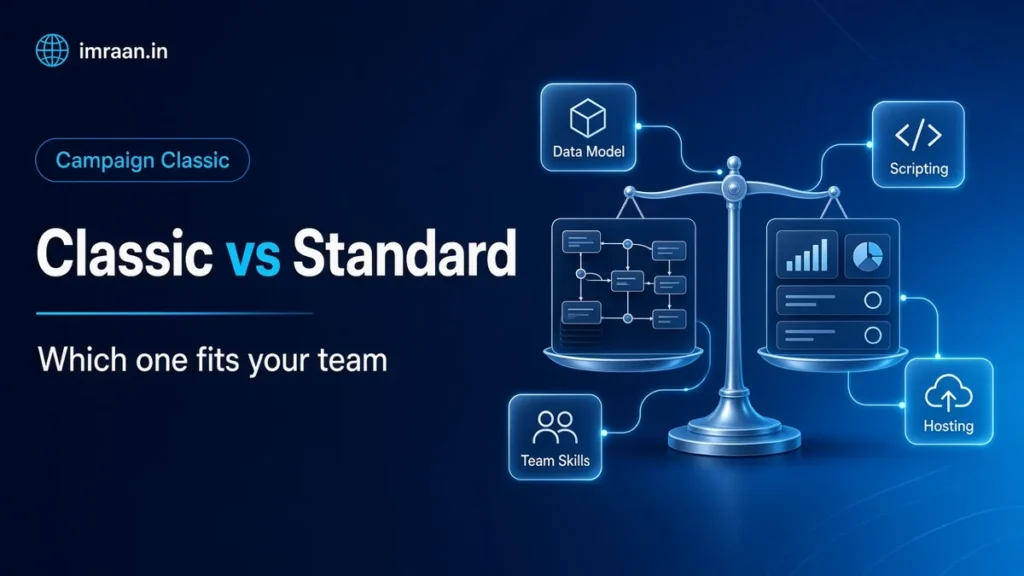
When a team first looks at Adobe Campaign, the first question is usually which Campaign. Campaign Classic vs Standard is a real choice between two products, and the sales material makes them sound closer than they are. I have worked mostly on Classic, and I have been in enough selection meetings to know that the right answer depends far more on the team than on the feature list.
Here I compare the two on the points that actually decide projects: data model, workflows and scripting, hosting, integration, and the skills you need to run each. Then I take one realistic brief and walk through the decision.
Campaign Classic vs Standard: two products, not two editions
Campaign Classic came to Adobe with Neolane. It is a mature platform built around a relational database you can shape, a set of server processes, and a Windows client console. The current version is v7. I described its architecture in my introduction to Campaign Classic.
Campaign Standard was built by Adobe later as a hosted, browser-based product. It has its own interface, its own data model and its own APIs, and it runs only in Adobe’s cloud.
They are not upgrade paths of each other. Moving from one to the other is a reimplementation, not a migration.
Data model in Campaign Classic vs Standard
This is the biggest difference, and the one I would look at first.
Classic lets you define the data model. The default recipient table can be extended with your own fields, you can create any number of custom tables with links between them, and you can even point Campaign at a different table as the profile. Everything is described in XML schemas, and the database structure follows. The data model documentation shows how much of the platform is built on this.
Standard gives you a predefined profile resource that you can extend, and custom resources for additional data, configured through the web interface. It covers common needs well, such as adding a loyalty tier or a purchases table. It is less suited to complex models with many related tables, or to designs where the profile is not a person.
If your data looks like “customers, their orders and their preferences”, either product can work. If it looks like “households, accounts, policies, claims and contracts, all linked”, Classic is usually the safer choice.
Workflows and scripting
Both products have workflows built from activities, and both cover querying, segmenting, importing and sending.
Classic workflows are more extensive. Alongside the standard targeting and data activities, you get JavaScript code activities, SQL code activities, and server-side scripting across the platform: in workflows, in delivery personalisation, in web applications and in custom SOAP methods. When a brief needs something unusual, there is almost always a way to build it. I go into the scripting side in my JavaScript activity guide.
Standard workflows are designed to be built by marketers in the browser without code. The activity set is narrower, and there is no free-form scripting inside workflows. That is a real limitation for complex logic, and a real advantage if you want marketers to own their workflows without developer help.
Hosting and operations
Classic can be hosted by Adobe, installed on your own infrastructure, or run in a hybrid setup where your marketing instance sends through an Adobe hosted mid-sourcing instance. The hosting models page describes each one. On-premise gives you full control, including server logs and configuration files, and full responsibility for upgrades, backups and security.
Standard, on the other hand, is hosted by Adobe only. You do not manage servers, builds or databases. Instead, Adobe handles upgrades on its own schedule.
If your organisation has a policy that customer data stays in its own data centre, that decides it: only Classic can do that.
Sending infrastructure and deliverability
This point often gets missed. With Classic on-premise, you run the mail transfer agent yourself, which means you own IP addresses, sending domains, DNS records, warm-up and reputation monitoring. That is real work, and it needs someone who understands deliverability. In a hybrid setup, the mid-sourcing instance hosted by Adobe does the sending, which takes much of that load off you while your data stays at home.
In contrast, with Standard and with fully hosted Classic, Adobe runs the sending infrastructure, and you work with Adobe on domain setup and deliverability. For a team without email infrastructure experience, that is a significant benefit that does not show up in feature comparisons.
Interfaces and who uses them
Classic uses a Windows client console for most work, with some features in the browser. The console is powerful and dense. New marketers need training, and developers spend a lot of time in it.
Standard, by comparison, is fully browser-based, with a cleaner, more guided interface. As a result, marketers usually get productive faster.
This sounds like a cosmetic point, but it shapes who does the work. In most Classic teams I have seen, a technical team builds and maintains workflows and templates, and marketers run campaigns inside that structure. In Standard teams, however, marketers tend to build more themselves.
Integration and APIs
Classic exposes SOAP web services for its data and business APIs, and you can add your own SOAP methods to schemas. It also supports Federated Data Access, which lets workflows query external databases directly, and connectors for CRM systems. I cover the API side in the SOAP API guide.
Standard exposes REST APIs, accessed through Adobe I/O, which are easier for modern web teams to work with. Its integration with other Adobe Experience Cloud products tends to be more out-of-the-box.
If you already run both, Adobe provides a connector between them. The ACS Connector page explains how Classic can replicate profiles and audiences to Standard, so central data management stays in Classic while some teams send from Standard.
Modules and advanced features
Classic has a longer list of optional modules, depending on your licence: Interaction for offer management, Distributed Marketing for central and local campaigns, Marketing Resource Management, Response Manager, campaign optimisation with typology rules, and more. Some of these, in fact, have no Standard equivalent.
Standard covers the core channels (email, SMS, push, direct mail), landing pages, transactional messaging and reporting, with a simpler setup.
Campaign Classic vs Standard side by side
| Topic | Campaign Classic v7 | Campaign Standard |
|---|---|---|
| Hosting | Hosted, hybrid or on-premise | Hosted by Adobe only |
| Interface | Windows console plus some web features | Browser |
| Data model | Fully configurable through XML schemas | Extensible profile and custom resources |
| Scripting | JavaScript and SQL across workflows, deliveries, web apps | No free-form scripting in workflows |
| APIs | SOAP, including custom methods | REST through Adobe I/O |
| External databases | Federated Data Access option | Not a core feature |
| Optional modules | Many, such as Interaction and Distributed Marketing | Fewer |
| Typical team | Developers plus marketers | Marketers with light technical support |
The worked example: one team’s decision
Here is a hypothetical brief, the kind that comes up in selection meetings.
A mid-sized travel company has six marketers and one developer who works across several systems. Customer profiles live in a cloud CRM, and bookings live in an in-house booking database. They want email, SMS and push. In the first year they want welcome journeys, booking confirmations and pre-trip reminders. In the second year they want personalised offers based on destination and booking history. Their IT policy allows customer data in a vendor cloud.
Here is how I would think through it.
Data model. Profiles plus bookings plus destinations. That is a few related tables, not a complex model. Even so, both products can handle it. Slight edge to Classic for the year-two offers, which need richer booking history.
Team. Six marketers and one shared developer is the deciding factor. A Classic platform needs someone who knows schemas, workflows and the console well, every week, not just at launch. With one shared developer, Classic would make that person a bottleneck. Standard, however, lets the marketers do more without them.
Hosting. The policy allows cloud hosting, so Standard’s hosted-only model is not a blocker.
Integration. Booking confirmations are transactional and triggered by the booking system. In addition, both products support transactional messaging. Standard’s REST APIs fit a web team better than SOAP.
Year two. Personalised offers are where Classic’s Interaction module is strongest. But the team does not need them yet, and a simpler rule-based approach in Standard may be enough for a first version.
My recommendation for this team
On balance, I would recommend Standard for this team today, with a clear note that if the offer requirements grow complex, or if the team gains developers, Classic becomes the better fit. If the same brief came from a company with a three-person Campaign technical team, a data warehouse they wanted to query directly, and a policy against cloud hosting, I would recommend Classic without much debate.
How to run your own Campaign Classic vs Standard comparison
Rather than scoring feature lists, I suggest answering these questions honestly:
- Where must the data live? If on your own infrastructure, the choice is made.
- How many people will build and maintain the platform each week? Not at launch, but in year two.
- What does your data model look like on a whiteboard? Count the tables and links.
- What will need custom logic? List the briefs from the last year that a simple tool could not handle.
- Which optional modules do you actually need? Not would like, need.
- How will other systems talk to it? SOAP or REST, batch or real time.
If most answers point towards control, complexity and in-house technical skills, Classic is the better fit. If they point towards speed, simplicity and marketer ownership, Standard usually is.
Mistakes in product selection
- Choosing on the demo. The demo shows the interface. The first six months show the data model and the team.
- Underestimating Classic’s running cost in people. The licence is only part of it.
- Assuming you can switch later. Moving from one product to the other means rebuilding templates, workflows and integrations.
- Ignoring hosting policy until late. It can rule out one product completely.
FAQ
Can I start on Standard and move to Classic later?
You can, but treat it as a new implementation. Data can be moved, but workflows, templates and integrations need to be rebuilt.
Is Classic being replaced by Standard?
Adobe continues to release new builds of Classic v7, and both products are offered. So choose on fit, not on guesses about the roadmap.
Do Campaign Classic and Standard support the same channels?
The core channels, email, SMS, push and direct mail, are in both. Details such as specific connectors and advanced options differ, so check the channel requirements against each product’s documentation for your licence.
Can one company use both Classic and Standard?
Yes. Some organisations run Classic as the central platform and give local teams Standard, connected through the ACS Connector.
In the next post in this series, I look at upgrading Classic itself, from v6 to v7, which is a bigger project than most teams expect.
Last updated on 26 October 2026
Related articles
Adobe Campaign Classic Operator Roles and Permissions: Access Control Explained
Set up Adobe Campaign operator permissions properly: operators, groups, named rights, folder access and a worked team design.
How to Debug Workflow Errors in Adobe Campaign Classic
How I debug Adobe Campaign workflow errors: journals, SQL logging, stuck activities, common messages and a repeatable triage…
How to Integrate Adobe Campaign Classic with External CRMs and Legacy Systems
How to integrate Adobe Campaign Classic with CRMs and legacy systems: CRM connectors, FDA, file exchange and SOAP,…