Mastering Asynchronous JavaScript & Event Loop

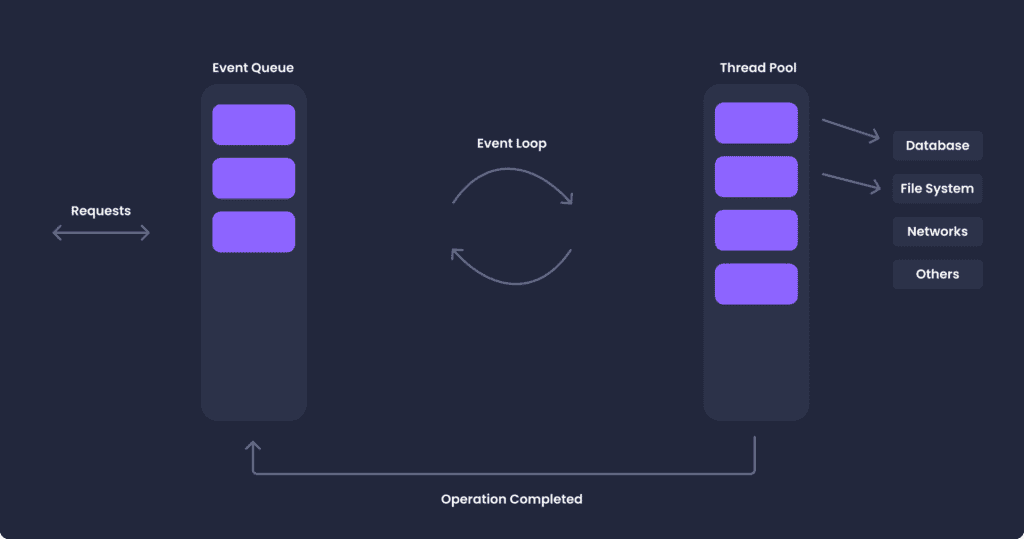
Asynchronous code is what keeps a web app responsive while it waits on the network, timers or user input. I cover how asynchronous JavaScript works and how the Event Loop schedules it.
Asynchronous JavaScript: Breaking It Down
In JavaScript, operations are traditionally synchronous or performed one at a time in the order they’re written. However, when dealing with operations like fetching data from a server or loading images, which could take an unknown amount of time, synchronous processing doesn’t cut it.
This is where asynchronous JavaScript comes in. It allows us to perform time-consuming operations without stopping the rest of our code from running. This is achieved through several techniques:
Callbacks
A callback is a function that’s passed into another function as an argument to be executed later. For instance, if we wanted to fetch data from a server and then manipulate it, we might pass a callback into our fetch function like this:
fetch('https://api.example.com/data', function(data) {

// Do something with the data

});
Promises
Promises are objects that represent a future outcome. They can be in one of three states: pending, fulfilled, or rejected. Promises are returned from functions and have .then() and .catch() methods for handling the fulfilled or rejected state, respectively.
In this example, the await keyword tells JavaScript to wait for the fetch operation to complete before continuing with the rest of the function.
const promise = new Promise((resolve, reject) => {

// Some asynchronous operation

});

promise.then(result => {

// Do something with the result

}).catch(error => {

// Handle the error

});
Async/Await
Async/await is a more recent addition to JavaScript, and it’s essentially syntactic sugar over promises, making asynchronous code look and behave more like synchronous code.
async function fetchData() {

const response = await fetch('https://api.example.com/data');

const data = await response.json();

// Do something with the data

}
In this example, the await keyword tells JavaScript to wait for the fetch operation to complete before continuing with the rest of the function.
Unraveling the Event Loop
The event loop is a simple concept with powerful implications. It’s essentially a loop that enables JavaScript to perform non-blocking operations by offloading operations to the system kernel whenever possible.
Here’s a simple representation of how it works:
- When the JavaScript engine runs your code, it first goes through the synchronous tasks from top to bottom.
- If it encounters an asynchronous task, like a setTimeout, AJAX call, or a Promise, it hands them off to the relevant Web API provided by the browser (or Node.js environment for server-side).
- These APIs execute the task outside of the JavaScript thread and place a callback function (provided while calling the asynchronous function) into a “callback queue” once they finish their job.
- The event loop continually checks whether the call stack (where the JavaScript engine maintains the running tasks) is empty. Once it’s empty, the event loop starts moving callbacks from the callback queue to the call stack to be executed.
- This process continues for as long as your application runs, with the event loop endlessly checking the call stack and the callback queue.
By understanding this sequence, we gain insight into how JavaScript operates behind the scenes and why our asynchronous code behaves the way it does.
Final thoughts
Understanding Asynchronous JavaScript and the Event Loop is critical to writing efficient and responsive JavaScript applications. By effectively utilizing callbacks, promises, async/await, and understanding how the event loop works, we can write JavaScript code that performs optimally and provides a smooth user experience.
Remember, becoming proficient with these concepts takes practice and patience, but the payoff is a deep understanding of JavaScript’s asynchronous nature and the ability to write high-performing code.
Callbacks, promises and async/await all run on the same Event Loop. Once you know how work moves from the call stack to the Web APIs and back through the callback queue, async bugs get much easier to reason about.
Related: Event Bubbling in JavaScript
Related articles
Instantly Edit Websites with Chrome designMode
Use Chrome document.designMode for temporary copy and layout mockups. Steps, limits, a11y warnings, and when to use DevTools…
JavaScript in AI Development: Browser and Node Tutorials
Practical JavaScript AI tutorial: local embeddings in Node, browser image classification with Transformers.js, ONNX/WebGPU notes, and a ship…
Event Bubbling in JavaScript
Executive Summary: Nested DOM events fire on the target then climb parent nodes, which surprises teams who attach…
Junior desk has a tiny async cheatsheet printed from your section. Already prevented one busy-wait mistake.
Macrotask examples I could run made this clearer than abstract posts. Event loop mental model finally stuck.
This helped. Especially async vs parallel in JS.
Callback queue surprises still hit our team. Sending people here beats redrawing the same whiteboard diagram.
Teaching promises got less hand-wavy after your event loop story. Mentoring sessions use this framing now.