Instantly Edit Websites with Chrome designMode
Use Chrome document.designMode for temporary copy and layout mockups. Steps, limits, a11y warnings, and when to use DevTools overrides instead.


document.designMode turns any page into a temporary editable document. I use it in stakeholder reviews when someone wants to see a headline change before we open Figma or a CMS. It is a console one-liner, not a CMS, and nothing you type is saved.
Enable edit mode
- Open the page in Chrome (or any Chromium browser).
- Open DevTools: right-click → Inspect, or F12 / Cmd+Option+I.
- Open the Console tab.
- Run:
document.designMode = 'on' - Click text on the page and type. Refresh to discard everything.
Turn it off with document.designMode = 'off'. Spec reference: MDN Document.designMode.
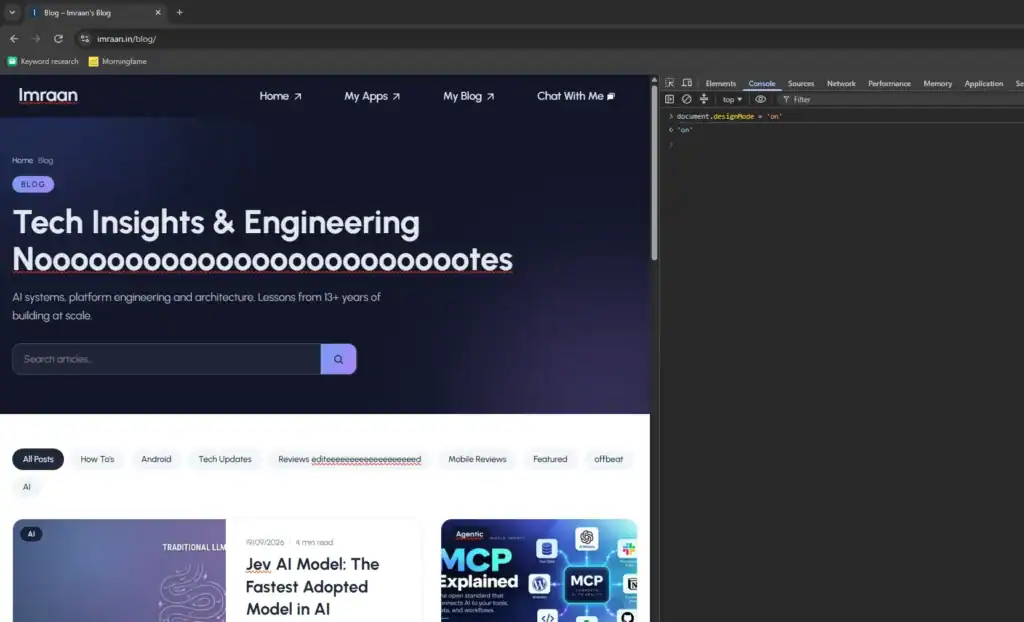
What it is good for
- Copy mockups in context: swap a hero line or CTA label and screenshot the real layout, fonts, and breakpoints.
- Review alignment: show a PM or designer the change on production CSS without a branch.
- Quick a11y spot-checks: lengthen labels and see if text truncates or overflows. This is a visual check only, not an audit.
Hard limits (read these before you demo)
- Not persisted. Reload, navigation, or a service worker refresh wipes edits. Never tell a client “we updated the site” after a designMode session.
- Not a design tool. Dragging nodes is unreliable. Complex widgets (canvas, shadow DOM, contenteditable islands, virtual lists) often ignore or fight designMode.
- Accessibility risk if misused. Editing live copy does not update accessible names in all cases, does not fix focus order, and can leave the DOM in a confusing state for screen reader demos. Use it to spot overflow and truncation; run a real pass with keyboard + axe or Lighthouse afterward.
- Images and media. You might replace an
imgvia the Elements panel, but designMode alone is a poor image editor. - Auth and paywalled apps. You are still in your session. Do not paste secrets into a shared screen recording.
Better siblings when designMode is not enough
- Elements panel: edit text nodes or attributes when you need surgical DOM changes.
- Local overrides / Workspace: persist CSS or static file tweaks across reloads during a session.
- Screenshot + annotate: for async feedback, capture the designMode result and mark it clearly as a mock.
If you are prototyping beyond fake copy, wire real UI in your frontend stack. For JS-heavy product work on this site, see the JavaScript in AI development tutorial when inference belongs in the browser, and keep SEO/perf constraints in mind via Technical SEO 2026.
Bottom line: designMode is a sharp, temporary review tool. Use it to align humans on copy and layout. Do not confuse it with publishing, accessibility compliance, or source-of-truth design.
Related reading: Technical SEO 2026, LangChain 101, and Spring Boot DI.
Related articles
JavaScript in AI Development: Browser and Node Tutorials
Practical JavaScript AI tutorial: local embeddings in Node, browser image classification with Transformers.js, ONNX/WebGPU notes, and a ship…
Event Bubbling in JavaScript
Executive Summary: Nested DOM events fire on the target then climb parent nodes, which surprises teams who attach…
Concurrency & Parallelism in JavaScript
Executive Summary: JavaScript is single-threaded, so concurrency and parallelism get mixed up and UI freezes follow. I separate…



Inspect plus tweak without redeploy remains the fastest way I prototype copy changes before bothering engineering.
Ops reply had fewer clarifying questions. Wording around chrome live edit slipped into the runbook.
Coffee notes stayed unusually short. Highlight for ops was inspect tweak copy.
Inspect and tweak without redeploy is my favorite quick demo for stakeholders. Chrome as a sandbox works surprisingly well.