What Is Python Used For? Uses, Strengths, and When to Choose It
Python runs web APIs, data pipelines, automation scripts, and machine learning systems. Here is where it fits, where it does not, and how to decide.


A team I worked with once replaced a 400-line shell script with 60 lines of Python. The script parsed access logs, counted status codes, and emailed a report. The new version ran slightly slower. However, nobody cared, because the job ran once a night and people could finally read the code.
That story captures the answer to what is Python used for. It is a general-purpose, interpreted programming language that favors readable code and a large standard library. In practice, teams use it wherever developer time costs more than machine time.
I wrote this guide on Python 3.10, the stable release at the time, and every example also runs on later 3.x versions. For a new install, use the latest stable release listed on python.org. You need a terminal and basic programming knowledge in any language. Every example uses only the standard library, so you do not need to install packages.
My position is simple: the language is the right default for most backend, data, and scripting work, and the wrong tool for a small set of jobs that you can name in advance. The rest of this guide shows you how to tell them apart.
What is Python used for in practice
The language shows up in four areas far more than anywhere else. Each area has mature libraries, good documentation, and many developers who know them. Consequently, hiring and onboarding are easier than with niche languages.
| Area | Typical work | Common libraries | Why it fits |
|---|---|---|---|
| Web backends | REST APIs, admin tools, server-rendered sites | Django, Flask, FastAPI | Requests mostly wait on a database or another service |
| Data analysis | Cleaning, joining, and summarizing tables | pandas, NumPy, Jupyter | Heavy math runs in compiled C code under a Python API |
| Automation | Log parsing, file moves, cloud scripts, glue code | Standard library, Ansible, boto3 | Short scripts that stay readable six months later |
| Machine learning | Training and serving models | scikit-learn, TensorFlow, PyTorch | The research community publishes in Python first |
It also appears in testing, scientific computing, education, and command-line tools. However, those four areas explain most Python job listings.
Check your Python version first
Before you run any example, confirm which interpreter your terminal uses. Many systems still ship an old interpreter, and Python 3.6 reached end of life in December 2021.
python --version
You should see output like this:
Python 3.10.1
On macOS and Linux, the command may be python3 instead of python. On Windows, the py launcher also works: run py -3.10 --version. If you see a version below 3.10, install a current release from python.org before you continue.
Why Python reads like pseudocode
Its main strength is that a working program looks close to the idea in your head. The language uses indentation for blocks, so the layout of the code is the structure of the code. Moreover, the standard library covers files, JSON, HTTP, dates, and text without any installs.
Here is a complete script that counts HTTP status codes in a web server access log. Save it as status_count.py.
from collections import Counter
from pathlib import Path
import sys


def count_status_codes(log_path: Path) -> Counter:
    counts = Counter()
    with log_path.open(encoding='utf-8') as handle:
        for line in handle:
            parts = line.split()
            if len(parts) >= 9 and parts[8].isdigit():
                counts[parts[8]] += 1
    return counts


def main() -> int:
    if len(sys.argv) != 2:
        print('usage: python status_count.py ACCESS_LOG')
        return 2
    log_path = Path(sys.argv[1])
    if not log_path.is_file():
        print(f'error: {log_path} is not a file')
        return 1
    for status, total in count_status_codes(log_path).most_common():
        print(f'{status}  {total}')
    return 0


if __name__ == '__main__':
    raise SystemExit(main())
Run it against a log file in the common Nginx or Apache format:
python status_count.py access.log
200  18422
304  2210
404  317
500  12
Notice what the script does not contain: no manual memory handling, no build step, and no type declarations that you must satisfy before it runs. The with block closes the file even if a line raises an error. The trade-off is that mistakes such as a misspelled variable name appear only when that line executes.
What Python 3.10 adds for beginners
Version 3.10 improved error messages, which matters more to a new user than any syntax feature. For example, an unclosed bracket used to produce a confusing error on a later line. Now the interpreter points at the real problem:
  File "report.py", line 3
    totals = {'ok': 200, 'missing': 404
             ^
SyntaxError: '{' was never closed
Similarly, a misspelled name now comes with a suggestion:
NameError: name 'totl' is not defined. Did you mean: 'total'?
Version 3.10 also added the match statement, known as structural pattern matching. It checks the shape of data and pulls values out in one step.
def describe(event: dict) -> str:
    match event:
        case {'type': 'click', 'x': x, 'y': y}:
            return f'click at {x},{y}'
        case {'type': 'key', 'key': key}:
            return f'key {key}'
        case _:
            return 'unknown event'


if __name__ == '__main__':
    print(describe({'type': 'click', 'x': 10, 'y': 20}))
    print(describe({'type': 'scroll'}))
click at 10,20
unknown event
Use match when you branch on the structure of data, such as parsed JSON. For a plain comparison against two or three values, if and elif remain clearer. Note that code using match does not run on 3.9 or earlier.
The myth: Python is too slow for production
The most repeated claim about the language is that it is too slow for real systems. The claim is half true, and the true half is narrow. Pure Python loops are slow compared with compiled languages. However, most production code does not spend its time in those loops.
You can see the gap yourself. This is my own illustrative test, and your numbers will differ by machine. The first command sums a million integers with a plain loop. The second uses the built-in sum, which runs in C.
python -m timeit -s "data = list(range(1_000_000))" "total = 0" "for n in data: total += n"
python -m timeit -s "data = list(range(1_000_000))" "sum(data)"
On my laptop, the loop takes several times longer than the built-in. That result explains how the language stays practical. The interpreter is slow, but the work usually happens somewhere else.
Where the time goes in a typical web request

  client ----> Python handler ----> database query ----> Python handler ----> client
               (microseconds          (milliseconds          (microseconds
                to low ms)             on the network)        to low ms)

  Rewriting the handler in a faster language rarely moves the total much,
  because the database round trip dominates.
Therefore, the useful question is not whether Python is slow. Ask where your program spends its time. If the answer is the network, the disk, or a compiled library such as NumPy, interpreter speed rarely limits you.
The original insight: count the boundary crossings
Here is a heuristic that the documentation does not spell out. Performance depends less on how much work you do and more on how often you cross between the interpreter and compiled code. One call that processes a million items in C is fast. A million calls that each process one item are slow, even though the total work is equal.
Consequently, fast code hands large batches to built-ins and libraries. Slow code loops in the interpreter and touches one element at a time. Keep that picture in mind and most performance advice follows from it.
Where Python struggles
A fair answer also names the weak spots. The language has three that you should know before you commit to it.
- CPU-bound work on many cores. The standard interpreter, CPython, has a global interpreter lock (GIL). Only one thread runs Python code at a time. As a result, threads do not speed up pure Python number crunching. You use multiple processes instead, which costs memory.
- Distribution. A program ships as source code plus an interpreter. Sending a single small binary to users is hard. By contrast, Go and Rust compile to one file.
- Errors found at runtime. The interpreter checks types while the program runs. A typo in a rarely used branch can sit unnoticed until production reaches it. Tests and optional type hints reduce the risk, but they take discipline.
A mistake I have seen in production is a nightly pricing job written as nested loops over two large lists. It ran for hours and people blamed the language. Replacing the inner loop with a dictionary lookup cut the runtime to minutes, without changing languages. In my experience, the algorithm is the problem far more often than the interpreter.
How real systems use Python in production
Production Python tends to follow a few repeatable patterns. Knowing them helps you judge whether your project resembles a typical success case.
- API layer in front of a database. A Django or Flask service validates input, runs queries, and returns JSON. Several worker processes handle requests in parallel, which sidesteps the GIL.
- Batch data pipelines. Scheduled jobs read files or tables, transform them with pandas, and write results. The job runs for minutes, and nobody waits on it interactively.
- Glue between systems. Scripts call cloud APIs, move files, and trigger other tools. Here it replaces shell scripts that grew too long to maintain.
- Model training and serving. The training code describes the model, while TensorFlow or PyTorch run the math on compiled kernels and GPUs.
- Python around a fast core. Teams keep the hot path in C, C++, or Rust and expose it to Python, which handles configuration, orchestration, and tests.
The common thread is that Python coordinates work and something else does the heavy lifting. When that description fits your system, it is a safe choice. The cost is operational: you manage an interpreter, dependencies, and worker processes on every server.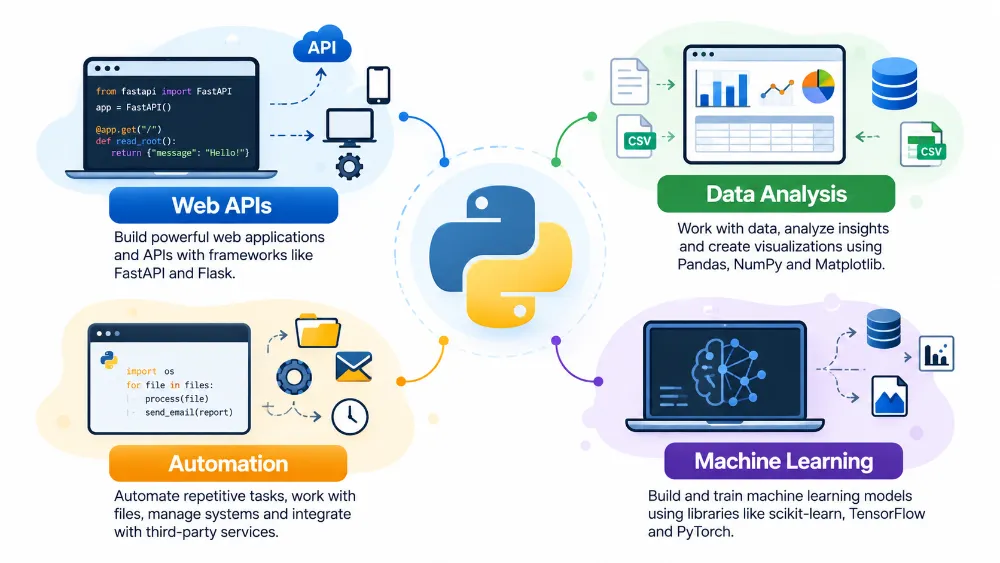
Choosing Python: a decision framework
Work through these questions in order. Stop at the first one that gives a clear answer.
- Does the program mostly wait? If it waits on databases, HTTP calls, or files, choose Python. Interpreter speed will not be your bottleneck.
- Does a mature library already solve the hard part? If pandas, NumPy, scikit-learn, or Django covers your core need, choose Python. The library is the product, and the language is the interface.
- Is the hot path a tight loop over custom logic? If you must run your own arithmetic millions of times per second, prefer Go or Rust, or write that part as an extension.
- Do you ship software to end-user machines? If you need one small executable or a mobile app, pick a language built for that target.
- Who maintains it? If analysts, operations staff, and engineers all need to read the code, Python’s readability outweighs most other factors.
| Your situation | Recommendation |
|---|---|
| Internal REST API with a SQL database | Python |
| Data cleaning and reporting | Python |
| Replacing a long shell script | Python |
| Training a machine learning model | Python |
| Low-latency trading engine or game engine | Not Python for the core |
| Command-line tool shipped as a single binary | Go or Rust |
| Browser front end | JavaScript |
| Native mobile app | The platform’s own language |
When NOT to choose Python
Three cases come up often enough to name directly.
- Hard real-time or very low latency systems. If you must answer in a fixed number of microseconds every time, garbage collection pauses and interpreter overhead make Python a poor fit.
- Memory-constrained devices. The interpreter and its objects use far more memory than compiled code. MicroPython exists for microcontrollers, but it is a different runtime with a smaller library.
- Client-side apps for phones and browsers. Projects exist that run it there, yet tooling, app size, and platform support lag behind native options. You will fight the platform instead of building features.
In each case, the language can still play a supporting role in build scripts, tests, and data tooling around the main product.
Common mistakes
- Judging Python by a loop benchmark. A micro-benchmark of arithmetic in a
forloop says little about an API that waits on a database. Consequently, teams reject the language for work it handles well. - Using the system Python for projects. The interpreter that ships with your operating system is often old and shared with system tools. Installing packages into it can break those tools.
- Staying on an end-of-life version. Python 3.6 no longer receives security fixes. Running it in production means unpatched vulnerabilities and libraries that drop support.
- Writing Python as if it were another language. Index-based loops and manual file closing work, but they hide intent. The result is longer code with more bugs.
- Expecting threads to speed up calculations. Because of the GIL, CPU-heavy threads take turns. The program gets more complex without getting faster.
- Skipping tests because the script is short. Runtime-only errors mean an untested branch fails in front of users. A typo becomes an outage.
Key takeaways
- Python’s main uses are web backends, data analysis, automation, and machine learning.
- Choose Python when the program waits on I/O or when a compiled library does the heavy computation.
- Avoid Python for tight CPU loops, hard real-time systems, single-binary tools, and mobile or browser clients.
- Fast Python hands big batches to built-ins and libraries, so count how often you cross into compiled code.
- Run
python --versionfirst and use the latest stable Python 3 release for new work, since 3.6 has reached end of life. - Fix the algorithm before you blame the interpreter.
- Python’s readability is a feature for teams, because more people can review and maintain the code.
FAQ
What is Python mainly used for?
Python is mainly used for web backends, data analysis, automation scripts, and machine learning. It also serves as glue code that connects other systems, such as cloud services and databases.
Is Python good for beginners?
Yes. Python has plain syntax, clear error messages since version 3.10, and a standard library that covers common tasks. You can write a useful script on your first day without installing anything else.
Is Python too slow for production use?
No, for most workloads. It is slow at tight CPU loops written in pure Python. However, web services and data jobs spend most of their time waiting on I/O or inside compiled libraries, where interpreter speed matters little.
Can I build mobile apps with Python?
You can, using projects such as Kivy or BeeWare, but it is not the language’s strength. Tooling and platform support trail the native options, so most teams use Python for the backend and another language for the app.
Which Python version should I learn?
Learn the latest stable Python 3 release listed on python.org. Version 3.10 added the clearer error messages and the match statement used in this guide, and later releases keep both. Avoid Python 2 and Python 3.6, because both have reached end of life.
Pick Python when the program waits, not when it computes
The language earns its place because it lets small teams ship readable code on top of a huge library ecosystem. Its limits are real, but they are narrow and easy to spot before you start. Ask where your program spends its time, and the choice usually makes itself.
Rule of thumb: if your code mostly waits or mostly calls libraries, write it in Python; if it mostly loops over your own math, write that part in something else.
Related articles
LLM App Production Checklist: Cost, Caching, Retries, and Safety
Eleven practices that keep an LLM feature alive in production, ranked by impact, each with a wrong example,…
How to Test and Evaluate LLM Applications in Python
Separate deterministic tests from evals, build a golden dataset, score with code before judges, and read pass rates…
How to Build an MCP Server in Python
Expose your own tools and data to AI assistants through the Model Context Protocol: a complete Python server,…
